
Shop Floor Management Software
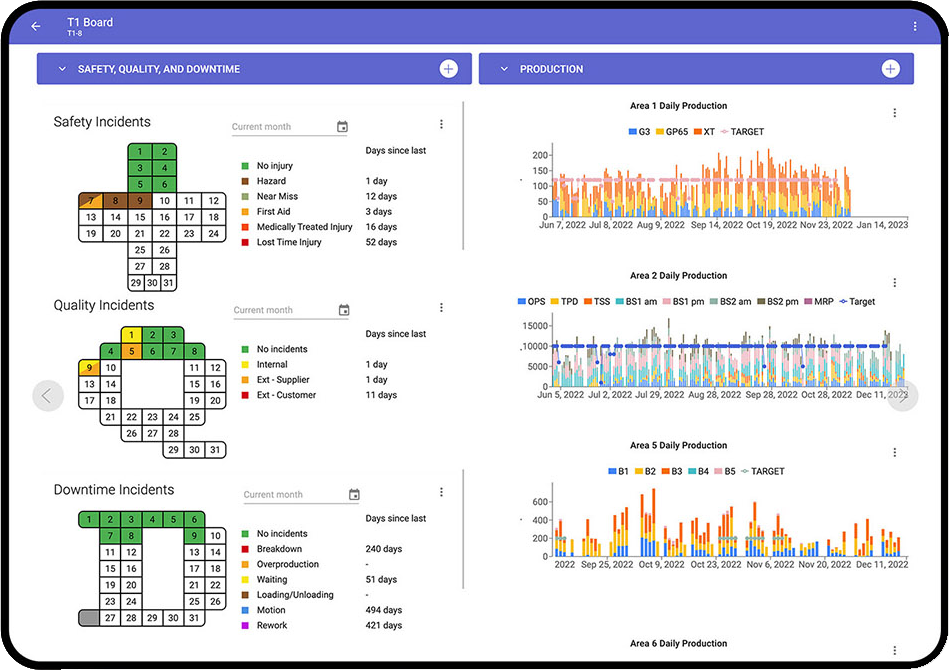
TeamAssurance is shop floor management software that runs your tier meetings, visual boards, actions and escalations in one live system, so every shift can see its performance, raise problems and get support the same day.
The basics
What is shop floor management software?
Shop floor management software digitises the routines that run production day to day: short tier meetings at the line, visual boards showing safety, quality, delivery, cost and people measures, and the actions and escalations that come out of each meeting.
It replaces whiteboards and spreadsheets with a live system that connects frontline teams to supervisors, site leaders and head office, so problems raised on the floor reach the people who can solve them and the answers come back down.
What it does
Everything a shift needs to run well
Digital tier boards
Custom build your daily meeting agenda into a live Tier Board in about five minutes, accessible from anywhere.
Measures and KPIs
Build key performance indicators for input, output, outcome and impact metrics directly on your board.
Structured escalation
Issues flow upward through the tiers with full context, so the right level of leadership addresses each problem.
Actions that get closed
See New, To Do and Overdue activities in each team's list, and link any activity to the meeting agenda in real time.
Live integrations
Embed live spreadsheets or Power BI reports in a tier board, and add existing reports such as Safety Cross.
Cross-functional alignment
Safety, quality, maintenance and production work in one system where departments can see and support each other.
Compared
Whiteboards, spreadsheets or a shop floor system?
| Capability | Whiteboards | Spreadsheets | TeamAssurance |
|---|---|---|---|
| Visible to the team at the line | |||
| Actions with owners, due dates and reminders | |||
| Escalation to the next tier with context | |||
| History and trends kept after the board is wiped | |||
| Problems linked to A3s and improvement work | |||
| Consistent across shifts and sites |
How it works
From whiteboard to live system
- 01
Build your boards
Lay out each team's meeting agenda, measures and reports on a tier board, matched to how you run today.
- 02
Run the tier meetings
Teams review yesterday, plan today and raise problems, with actions captured as they are agreed.
- 03
Escalate and support
What a team can't solve moves up the tiers with context; answers and support flow back down.
- 04
Improve
Recurring problems become structured problem solving, and trends show where to focus next.
Use cases
Where teams use it
- Start-of-shift Tier 1 huddles at the line
- Tier 2 cross-functional reviews of escalated issues
- Weekly site leadership reviews of trends and priorities
- SQCDP and SQDC boards with targets and status
- Line efficiency tracking with custom tables
- Multi-site performance reviews at regional level
FAQ
Shop floor management software FAQ
What is shop floor management software?
It is software that digitises daily shop floor routines: tier meetings, visual performance boards, actions and escalations. It gives frontline teams and leaders the same live view of performance and problems.
How is shop floor management different from a daily management system?
They describe the same routines from different angles. Shop floor management focuses on running production at the line; a daily management system is the wider structure of tiered meetings, leader standard work and visual controls that connects the line to site and regional leadership.
What should a digital shop floor board show?
A small set of measures, often grouped as safety, quality, delivery, cost and people, each with a target and status, plus open actions with owners and due dates and any escalations to the next tier.
Can we keep our physical boards?
Yes. Many teams keep a physical board where it suits the area and use TeamAssurance for actions, escalations and history between meetings. Boards can also be shown on screens at the line.
Does it work across multiple sites?
Yes. Each team and site runs its own boards in the same structure, and issues escalate through the tiers to site and regional leadership.
How long does it take to build a tier board?
A team can custom build its meeting agenda into a live Tier Board in about five minutes, then refine it as the meeting matures.
See your shop floor on one live board
We'll show you tier boards, actions and escalation built around how your teams already run.
Request a Demo