
Digital Work Instructions Software
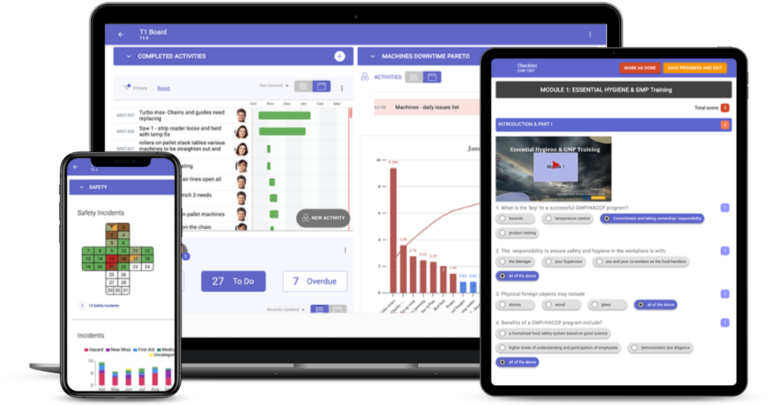
TeamAssurance turns standard work and SOPs into digital work instructions: step-by-step checklists with photos and key points on a phone or tablet at the workstation, linked to the skills matrix for sign-off and to layered process audits so the standard stays honest.
The basics
What are digital work instructions?
Digital work instructions are standard work presented as interactive steps on a screen at the point of use: each step with its key points, photos or short video, the checks to perform and the settings to use, in the order the task is done. The operator confirms each step, records the checks and raises an abnormality from the same screen.
Compared with a laminated sheet or a PDF in a document system, digital work instructions are always the current version, are searchable by task, record who followed which version, and connect to training: a sign-off records that the person was assessed against this standard, and a changed standard shows who needs re-instruction.
What it does
What digital work instructions include
Step-by-step with photos
Each step shows its key points, photos and checks; the operator confirms as they go, on a phone or tablet.
Always the current version
One controlled standard per task, searchable from the floor, with the version recorded against each completion.
Linked to the skills matrix
Sign-off records competence against this version; a change to the standard shows who needs re-training.
Raise abnormalities in the step
A deviation, missing part or quality concern becomes an action on the team's tier board from inside the instruction.
Audited through LPAs
Layered process audits check the instruction is followed; failed checks become corrective actions.
Answers from your own SOPs
Frontline teams can ask questions and get answers drawn from the organisation's own documents.
Compared
Paper, PDF or digital work instructions?
| Capability | Laminated sheet | PDF in a document system | TeamAssurance |
|---|---|---|---|
| Available at the workstation | |||
| Always the current version | |||
| Step confirmation and checks recorded | |||
| Abnormality raised from the instruction | |||
| Linked to training sign-off | |||
| Audited and improved through the daily rhythm |
How it works
From SOP to digital work instruction
- 01
Break the task down
Important steps, key points and reasons, with the people who do the task (TWI job instruction).
- 02
Build the instruction
Steps, photos, checks and settings as a checklist on the phone, with the version controlled.
- 03
Train and sign off
Competency assessment against the instruction, recorded in the skills matrix.
- 04
Audit and improve
Layered audits check it is followed; improvements update the standard and trigger re-instruction.
Use cases
Where teams use digital work instructions
- Changeovers and setups with marked settings and photos
- Quality checks built into the production step
- Autonomous maintenance checks on equipment
- Onboarding and cross-training against the current standard
- GMP sites recording who followed which version
- Multi-site operations keeping one standard per task
FAQ
Digital work instructions FAQ
What is the difference between an SOP and a digital work instruction?
An SOP is the controlled document describing the procedure. A digital work instruction is that procedure presented step by step on a screen at the workstation, with confirmation, checks and photos. The two should agree; the instruction is the floor-level version.
Who writes digital work instructions?
The people who do the task, with a supervisor or engineer facilitating. Instructions written away from the work miss the key points operators rely on.
How do digital work instructions connect to training?
Each instruction has a version. A competency assessment records that a person was assessed against that version, and when the instruction changes the skills matrix shows who needs re-instruction.
Can operators raise problems from inside an instruction?
Yes. A deviation, a missing part or a quality concern becomes an action on the team's tier board with the step and photo attached, so it is reviewed in the next huddle.
Do digital work instructions replace layered process audits?
No. They make audits easier: the auditor checks that the current instruction is followed, and failed checks become corrective actions.
Guided tour
See how digital work instructions fits the connected operation
A five-minute walkthrough of strategy, improvement and daily management on one system: the tier boards, the actions, the escalations and the problem solving, with worked examples from the floor up.
Learn more
Definitions
See a work instruction on the floor
Book a demo and we will walk a changeover instruction on a tablet, a check that fails, and the action that follows on the tier board.
Request a Demo