
Hoshin Kanri Software: Cascade Strategy to Daily Work
Hoshin kanri software helps a leadership team set a few breakthrough goals, cascade them to every level of the organisation and review progress each month. TeamAssurance runs strategy deployment in one place, so each goal links to the A3s, improvement activities and measures that deliver it, and to the daily tier meetings where the work gets done.
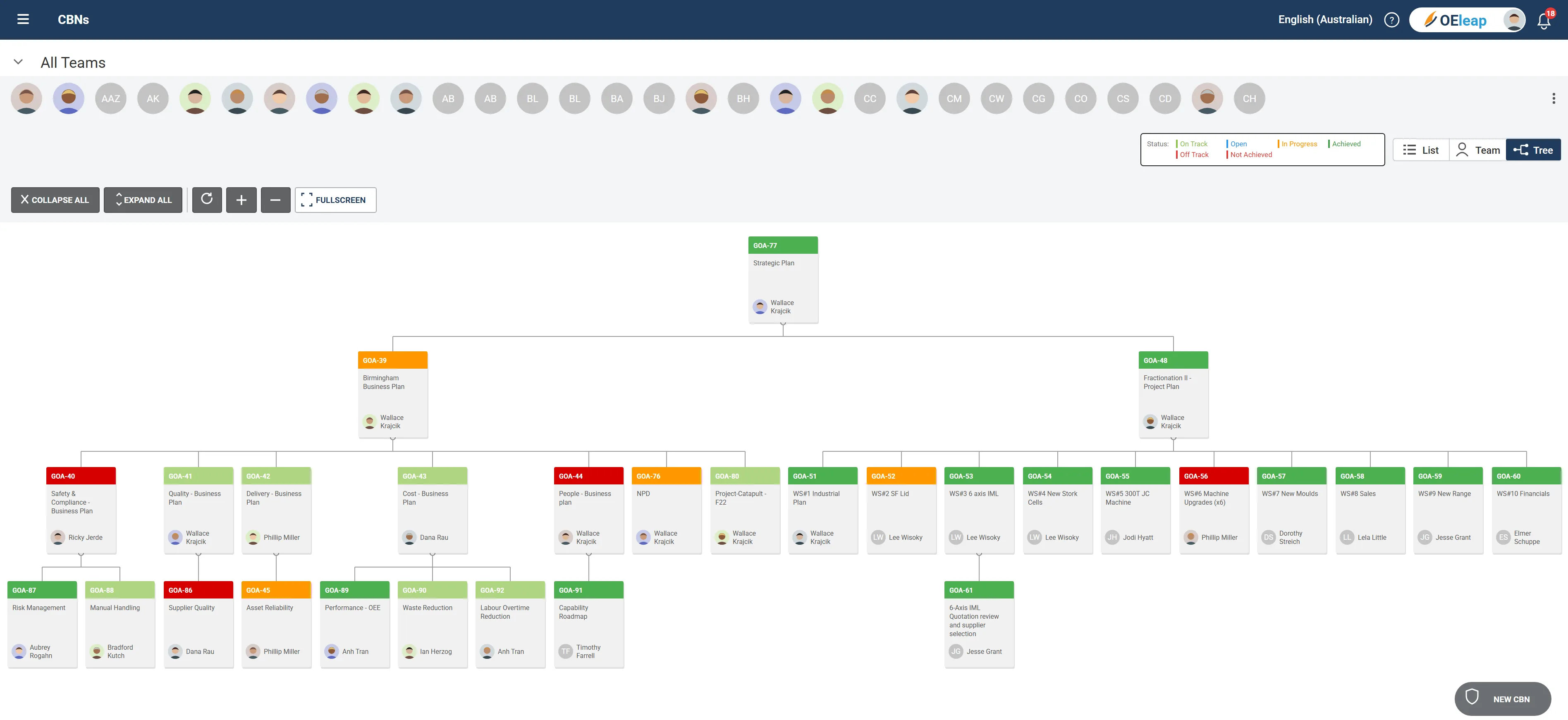
The basics
What is hoshin kanri software?
Hoshin kanri software is a tool that supports the hoshin kanri method of strategic planning, also called policy deployment. It records the three to five breakthrough objectives an organisation has agreed, breaks them into annual objectives and team goals, and keeps the links between each level visible. It also tracks the status of each goal so that leaders can see what is on track and what needs attention.
Many organisations run hoshin planning on large spreadsheets, slide decks and wall charts. Those work for a single planning round, but goals drift out of step with the level above, status updates are collected by hand, and the link between strategy and the work on the shop floor is lost. Hoshin kanri software keeps the goal structure, the owners, the dates and the history in one system that every level can open.
TeamAssurance is a daily management platform. Its strategy deployment capability sets goals with owners and dates, cascades them in a tree view, links each goal to A3 reports, improvement activities and measures, and shows the same goals in the tier meetings where tasks are tracked.
What it does
What hoshin kanri software should do
Goal creation with owners and dates
Create goals and assign them to individuals within teams, with visible start and due dates and progress tracked across the organisation.
Cascading goals in a tree view
Structure goals hierarchically so each one visibly contributes to its parent objective, and review the detail as it cascades down.
List, team and tree views
Filter goals by list, team or tree view, to suit a one-on-one, a team meeting or a high-level review of traffic-light status.
Links to A3s, projects and measures
Connect each goal to the A3 reports, improvement activities and measures that carry it out, so strategy and execution stay in one view.
Tasks tracked in daily management
Follow the tasks behind strategic goals through Tiered Daily Management, alongside the day-to-day work of the business.
Monthly status history
A monthly history of each goal's status makes at-risk goals easy to spot. Add notes or change status from the milestones.
Goal completion with history kept
Close achieved goals while keeping the history of their linked projects, and filter to view closed goals when needed.
AI agents across the platform
AI agents can summarise progress across linked goals, actions and tier meeting outcomes, so reviews start from the same facts.
Compared
How does hoshin kanri software compare with a planning spreadsheet?
| Capability | Spreadsheets and slide decks | Shared document or wall chart | TeamAssurance |
|---|---|---|---|
| Goals cascaded visibly from the level above | |||
| Goals linked to A3s, improvement activities and measures | |||
| Monthly status history for each goal | |||
| Strategic tasks tracked in the daily tier meeting | |||
| Views for list, team and tree review | |||
| One record for owners, dates and notes |
How it works
How is strategy deployed in TeamAssurance?
- 01
Create the breakthrough goals
Set the goals for the planning period with a clear owner, start date and due date for each one.
- 02
Cascade to teams
Assign goals to individuals and teams, and use the tree view to check that each goal contributes to its parent.
- 03
Link the work
Connect each goal to the A3 reports, improvement activities and measures that will deliver it.
- 04
Review monthly and in daily management
Track status by month and follow the critical tasks in Tiered Daily Management, so strategy is reviewed while the business keeps running.
Use cases
Where do organisations use hoshin kanri software?
- Annual strategic planning and setting breakthrough objectives
- Quarterly business reviews and goal cascading
- Department-level KPI and objective management
- Cross-functional improvement initiatives
- Individual performance goal alignment
- Prioritising continuous improvement projects against strategy
FAQ
Frequently asked questions about hoshin kanri software
What does hoshin kanri software do?
It records the breakthrough objectives an organisation agrees, cascades them into annual objectives and team goals, links each goal to the A3s, improvement activities and measures that deliver it, and tracks status month by month. TeamAssurance also shows strategic tasks in the daily tier meetings.
How is hoshin kanri different from management by objectives?
Hoshin kanri focuses the organisation on three to five breakthrough objectives, agrees the plan with each level through catchball, and reviews progress monthly through PDCA cycles. Software for it keeps that cascade and review cycle visible rather than leaving it in separate documents.
Can hoshin kanri goals be linked to daily work?
Yes. In TeamAssurance, strategic goals link to A3 reports, improvement activities and measures, and the tasks behind them can be tracked in Tiered Daily Management alongside the day-to-day work.
Who uses the goal tree in TeamAssurance?
Leaders use the tree view to check that each goal contributes to its parent objective. Team leaders use the list and team views for one-on-ones and team meetings, and the status history gives everyone the same picture each month.
Guided tour
See how strategy deployment fits the connected operation
A five-minute walkthrough of strategy, improvement and daily management on one system: the tier boards, the actions, the escalations and the problem solving, with worked examples from the floor up.
Learn more
Definitions
See strategy deployment in TeamAssurance
Book a demo to see how goals cascade, link to execution and show up in your daily tier meetings.
Request a Demo