
Shop Floor Control Software: Track Work, Respond to Problems the Same Shift
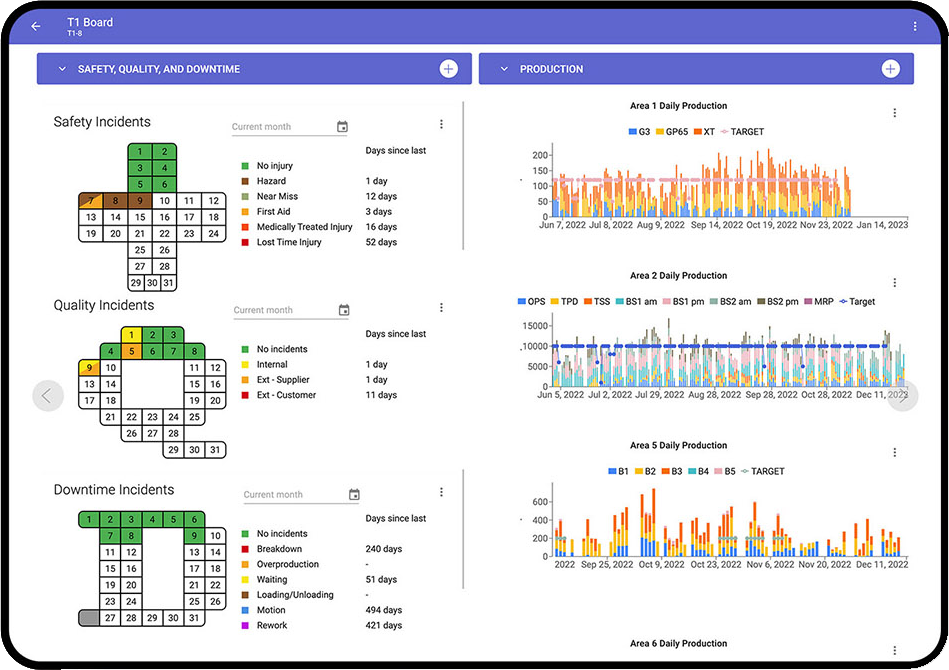
Shop floor control software releases jobs to the floor, tracks them through each operation and shows what is late or stuck. TeamAssurance is the daily management layer on top: the status is reviewed on the tier board each shift, and every problem becomes an action with an owner, an escalation path and a follow-up.
The basics
What is shop floor control software?
Shop floor control software is a tool that supports the activities of releasing work to the production floor, tracking it as it moves through each operation, and responding when it drifts from plan. Typical functions are job release, sequencing, progress and status tracking, and exception handling for shortages, breakdowns and late jobs. It is usually delivered as an ERP module, a manufacturing execution system (MES) or a scheduling tool. Smaller plants often run the same control with whiteboards and spreadsheets. For the definition of the practice itself, see [what is shop floor control](/glossary/what-is-shop-floor-control).
Control software tells you the state of the jobs. It does not, on its own, make sure people act on that state. A late job still needs someone to look at it at the start of the shift, agree the cause, own the fix and escalate it if the team cannot solve it. That routine is shop floor management, and it is where many plants lose time between a system showing red and the problem being fixed.
TeamAssurance is a daily management platform, not a scheduling system or an MES, so it does not replace the software that releases and sequences orders or collects machine data. It gives the shop floor the routine around that data: tiered meetings, visual boards, actions, escalation, audits and skills, so the problems the control system surfaces are closed rather than carried from shift to shift.
What it does
What to look for in shop floor control software
Job release against readiness
Look for software that only releases a job when materials, tooling, drawings and people are ready, so work does not start and stall.
Scheduling and sequencing
Each work centre needs a clear order of jobs that can be changed when something goes wrong. This sits in your ERP, scheduling tool or MES.
Plan against actual, visible to the team
Status is only useful if the line can see it. In TeamAssurance, measures for each area sit on the tier board for the shift to review.
Connection to existing systems
Control data usually lives in other systems. TeamAssurance connects with existing systems so their figures feed the same daily rhythm as the rest of the area's measures.
Exceptions raised as owned actions
A shortage or breakdown should leave the meeting as an action with an owner and due date, not a comment on a whiteboard.
Escalation when the shift cannot fix it
Unresolved problems move up through the tier meetings with their context, so supervisors and managers can remove the barrier.
Checks that the routine is followed
Layered process audits and gemba walks confirm that release rules and standards are followed, and gaps are raised as actions.
Skills for each task
A skills matrix shows who is trained for each operation, so a job is not released to a cell without a qualified operator.
Compared
Spreadsheet, shop floor control system or TeamAssurance?
| Capability | Spreadsheet or whiteboard | ERP module or MES | TeamAssurance |
|---|---|---|---|
| Work orders released and sequenced by work centre | |||
| Job progress and status tracked through operations | |||
| Status reviewed at the shift start on a tier board | |||
| Every problem raised as an action with an owner and due date | |||
| Escalation of unresolved problems through the tiers | |||
| Audits and gemba walks check the routine is followed | |||
| Skills matrix for who can run each task |
How it works
How shop floor control runs in TeamAssurance
- 01
Show the status
Plan against actual, and the problems behind any gap, appear on the area's tier board alongside safety, quality, delivery and cost.
- 02
Review at the shift start
The team leader and operators review yesterday, today's plan and known risks in the tier 1 meeting.
- 03
Assign the action
A shortage, breakdown or late job becomes an action with an owner and due date. Anything the team cannot fix escalates to the next tier.
- 04
Check and improve
Gemba walks and layered process audits confirm the routine is followed, and repeat problems move into five whys, fishbone or A3.
Use cases
Where teams use shop floor control with daily management
- Machining cells reviewing late jobs and missing fixtures at the start of each shift
- Assembly lines escalating material shortages to the supervisor and planner
- Food and beverage plants tracking line performance against the daily plan
- Multi-shift operations handing job status and open problems from one shift to the next
- Plants running an ERP or MES that want the floor to act on what it shows
- Multi-site manufacturers comparing how each site responds to problems
FAQ
Shop floor control software FAQ
What is shop floor control software?
Shop floor control software helps a plant release work to the floor, track it through each operation and respond when it drifts from plan. It is usually an ERP module, a manufacturing execution system (MES) or a scheduling tool, and some plants run the same control on paper or spreadsheets.
What is the difference between shop floor control and MES?
Shop floor control is the activity of releasing, tracking and correcting work on the floor. An MES is software that can do this with real-time data from machines and operators. A plant can have shop floor control without an MES, but an MES generally includes shop floor control functions.
What features should shop floor control software have?
Job release against readiness, scheduling and sequencing, plan against actual status, exception handling, and a way to record results. Just as important is a route from each exception to an owned action, because a status nobody acts on does not improve.
Is TeamAssurance shop floor control software?
TeamAssurance is a daily management platform. It does not replace a scheduling system or an MES. It supports the management side of shop floor control: tier boards, actions, escalation, audits and skills, and it connects with existing systems so their figures feed the daily meetings.
How does shop floor control relate to shop floor management?
Control tells you the state of the jobs; management is how people act on it every day. Plants need both: a system that shows what is late, and a routine that gets the problem owned and fixed.
Who uses shop floor control software on site?
Supervisors and team leaders use it day to day, with production planners and materials staff supporting. Plant managers review results and remove the problems the floor cannot fix at higher-tier meetings.
Guided tour
See how shop floor control fits the connected operation
A five-minute walkthrough of strategy, improvement and daily management on one system: the tier boards, the actions, the escalations and the problem solving, with worked examples from the floor up.
Learn more
Definitions
Make sure every shop floor problem gets an owner
Book a demo and we will show a late job reviewed on a tier board, raised as an action and escalated when the team cannot fix it.
Request a Demo