
Incident Reporting Software for Small Business
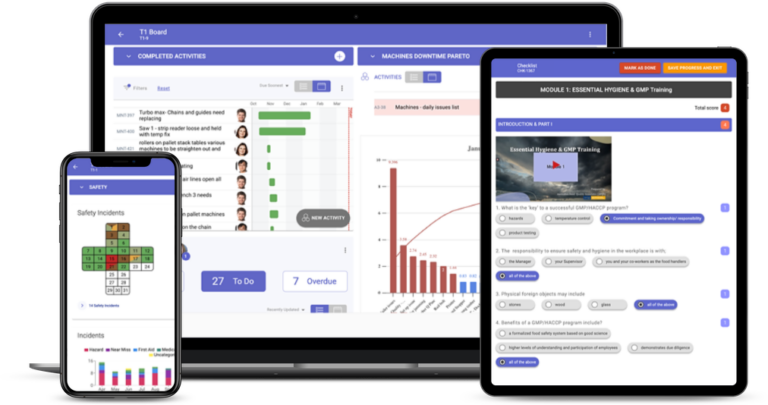
Incident reporting software for a small business lets anyone on the team report an incident or near miss from a phone, on a structured form with a photo, and makes sure someone fixes it. The right tool is simple enough for people to use on the spot and still keeps an owner, a due date and a record for every action. In TeamAssurance, reports reach the team's daily meeting and are followed through to a closed corrective action.
The basics
What should incident reporting software do for a small business?
A small business needs incident reporting software to do three things well: make reporting quick for anyone, including casuals and contractors; give each report an owner and a due date so it is acted on; and keep a clear record that can be shown to an insurer, a customer or a regulator. A phone-friendly form with a photo, a short list of incident types and a simple list of open actions covers most of it.
Small teams often start with paper forms, a shared spreadsheet or email. These work until someone is away, a form is lost in a ute, or nobody can say which actions are still open. The cost shows up when the same near miss happens again, or when you are asked for the record of what was done and cannot find it. Software replaces the pile with one list that anyone in the business can see.
What a small business can usually skip is a heavy risk register, long approval chains and separate modules for every task. Look for a tool that fits how your team already works. TeamAssurance is a daily management platform with safety management built in, so incidents and near misses are raised on structured digital forms and reviewed in the team's regular meeting. Notification rules differ by country, state and industry, so check what your regulator requires and use the platform to keep the records behind it.
What it does
What a small business should look for in incident reporting software
Reporting from a phone in about a minute
If a report is slower than walking past, it will not get done. Look for a form that works on any phone, with a photo, and no training session required.
Easy for everyone on the team
Employees, casuals and contractors should all be able to raise a report. Short structured fields keep reports consistent without a long form.
Structured incident forms
Type, location and severity are set fields, not free text, so reports can be routed and compared. In TeamAssurance, structured digital forms trigger the investigation and corrective actions.
Corrective actions with owners and due dates
Every report should lead to an action with a named owner and a due date, tracked until it is closed rather than left in an inbox.
Escalation when you cannot fix it yourself
Issues that the team cannot resolve rise to the next meeting with their context, so owners and managers see them without anyone forwarding an email.
Near misses and hazards in the same place
Recording near misses and hazards alongside incidents means early warnings are acted on before someone is hurt.
Simple trends
A view of where incidents and near misses cluster, by area and cause, shows what to fix first without needing a safety analyst.
A record you can show
Complete digital records of incidents, investigations and actions support insurers, customers, audits and regulators.
Compared
Paper and spreadsheets, a standalone register or TeamAssurance?
| Capability | Paper forms and spreadsheets | Standalone incident register | TeamAssurance |
|---|---|---|---|
| Report raised from a phone with a photo | |||
| Structured fields for type, location and severity | |||
| Corrective actions with owners and due dates | |||
| Incidents reviewed in the team's regular meeting | |||
| Escalation of unresolved issues | |||
| Near misses, hazards and inspections in the same system |
How it works
How to choose incident reporting software for a small business
- 01
List what you must record
Write down the incident types you see, such as injuries, near misses, hazards, property damage and spills, and what your insurer or regulator expects to be kept.
- 02
Test it on a phone
Ask someone who was not involved in the choice to raise a report on their own phone. If it takes more than a minute or needs explaining, people will not use it.
- 03
Check the route to a closed action
Raise a test incident and follow it. It should reach an owner, get a due date and show up on a list of open actions until it is closed.
- 04
Make it part of the routine
Review open incidents and actions in the meeting you already hold each day or week, so reporting leads to visible results and people keep reporting.
Use cases
Where small businesses use incident reporting software
- Reporting near misses on site before they become injuries
- Recording injuries, property damage and spills on a structured form
- Raising hazards from a phone with a photo
- Tracking corrective actions to closure with owners and due dates
- Reviewing safety first at the team's daily huddle
- Keeping records ready for insurers, customers and audits
FAQ
Incident reporting software for small business FAQ
What is the best incident reporting software for a small business?
The best one is the one your team will use. Look for quick reporting from a phone with a photo, structured forms, corrective actions with owners and due dates, and a clear record. Test it with someone who was not part of the decision before you commit.
Does a small business need incident reporting software?
Not by law in most places, but you still need a reliable way to record incidents and near misses and show what was done. Paper and spreadsheets work for very small teams, and software helps once reports get lost or nobody can say which actions are still open.
What should a small business incident report include?
The type of incident, the date, time and location, who was involved, what happened, any injury or damage, the immediate action taken, a photo where it is safe to take one, and the severity.
Can contractors and casual staff report incidents?
They should be able to. Reporting only works when everyone on site can raise a report quickly, so check how a new person would raise one on their own phone.
Is TeamAssurance incident reporting software?
TeamAssurance is a daily management platform with safety management built in. Incidents and near misses are reported on structured digital forms, trigger investigations and corrective actions, and are reviewed in the team's meetings, with escalation when the team cannot resolve them.
Does it help with regulatory reporting?
It keeps complete digital records of incidents, investigations and actions to support compliance. Notification rules differ by country, state and industry, so check what your regulator requires and when.
Guided tour
See how incident reporting for small business fits the connected operation
A five-minute walkthrough of strategy, improvement and daily management on one system: the tier boards, the actions, the escalations and the problem solving, with worked examples from the floor up.
Learn more
Definitions
Turn incident reports into actions your team closes
Book a demo and we will raise an incident from a phone, watch it become an owned corrective action and close it with a verified fix.
Request a Demo