
Hazard Reporting Tool for Frontline Teams
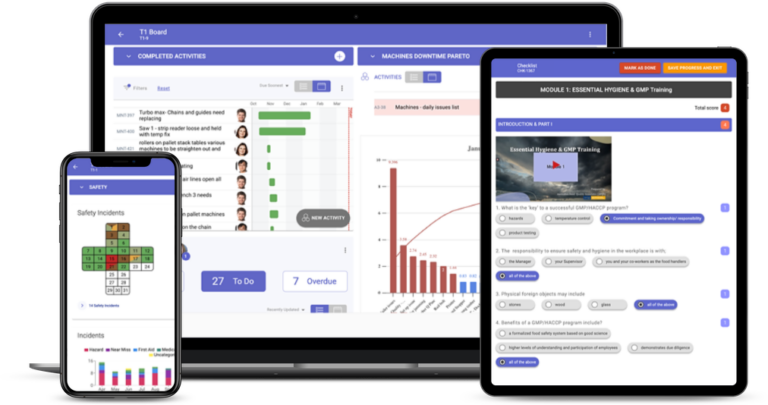
A hazard reporting tool lets anyone on site report a hazard from a phone or tablet in under a minute, with a photo and its location, and makes sure someone owns the fix. In TeamAssurance the report lands on the team's tier board the same shift, becomes a corrective action with an owner and a due date, and escalates if the team cannot control it.
The basics
What is a hazard reporting tool?
A hazard reporting tool is software, usually a mobile app, that workers use to report hazards they find at work: a damaged guard, a leaking valve, a blocked exit, a trailing lead. Each report records what the hazard is, where it is, a photo and the risk, and is routed to the person who can control it. Safety teams use the reports to fix hazards before anyone is hurt and to spot patterns across sites.
Paper hazard report forms and email inboxes fail for the same reason: the report is easy to lose and nobody can see what happened to it. When workers raise a hazard and hear nothing back, they stop reporting. A good hazard reporting tool fixes both ends: it makes raising a hazard faster than walking past it, and it shows the person who raised it that the hazard was controlled.
Hazard reporting sits between the safety observation and the incident report. A hazard is anything with the potential to cause harm; a near miss is an event where harm nearly happened; an incident is an event where it did. Most hazard reporting tools handle all three, because the same hazard often shows up first as an observation, then as a near miss, and the aim is to control it before it becomes an incident.
What it does
Features to look for in a hazard reporting tool
Report from a phone in under a minute
A short form on any phone or tablet: what, where, a photo and a few words. If it takes longer than walking past, people walk past.
Risk rating at the point of report
A simple likelihood and consequence rating, so a frayed lead on a forklift charger is not queued behind a sticky door.
Lands on the team's board the same shift
The hazard appears on the tier board of the team that owns the area, for review in the next huddle, not in a safety inbox.
Corrective actions with owners and due dates
Every hazard becomes an action with an owner, a due date and a hierarchy-of-control level, with a verification step before it closes.
Escalation when the team cannot control it
Unresolved or high-risk hazards move to Tier 2 and beyond with their photo and history, so leaders see critical risks straight away.
Feedback to the person who reported it
The reporter can see the action and its status, which is what keeps people reporting.
Leading indicators
Hazards raised, hazards closed on time and open high-risk hazards, on the same board as TRIFR and days since last recordable.
Repeat hazards into problem solving
The same hazard reported again moves into five whys, fishbone or A3, so the cause is removed rather than re-reported.
Compared
Hazard reporting app, paper form or daily management?
| Capability | Standalone hazard reporting app | Paper forms and email | TeamAssurance |
|---|---|---|---|
| Hazards reported from a phone with a photo | |||
| Risk rating and routing to the area owner | |||
| Hazard actions on the same board as quality and delivery actions | |||
| Reviewed in the team's daily huddle | |||
| Escalation through tier meetings with context | |||
| Corrective action verified before closure | |||
| Repeat hazards linked to structured problem solving |
How it works
How hazard reporting works in TeamAssurance
- 01
Spot and report
A worker raises the hazard on a phone with a photo, the location and a short description, in under a minute.
- 02
Rate and route
The hazard is rated for risk and lands on the tier board of the team that owns the area, for the next huddle.
- 03
Control and assign
The team agrees a control using the hierarchy of control, and the action gets an owner and a due date; anything they cannot control escalates.
- 04
Verify and close
The action closes only when the control is confirmed in place, the reporter sees the outcome and repeats go to problem solving.
Use cases
Where teams use a hazard reporting tool
- Manufacturing lines with hazards reviewed as the first item in the Tier 1 huddle
- Warehouses reporting forklift, racking and pedestrian hazards from the floor
- Mining and quarry crews raising hazards from Take 5s and pre-starts
- Construction sites linking hazards to JSAs and toolbox talks
- Food and beverage plants combining hazard, hygiene and quality reports
- Multi-site operations comparing hazards raised and closed by site
FAQ
Hazard reporting tool FAQ
What is a hazard reporting tool?
A hazard reporting tool is software, usually a mobile app, that lets workers report workplace hazards with a photo, location and risk rating, routes each report to the person who can control it and tracks the corrective action until it is closed.
What should a hazard report include?
What the hazard is, where it is, when it was found, who found it, a photo, a risk rating (likelihood and consequence), any immediate action taken to make it safe, and the person responsible for the permanent control.
What is the difference between a hazard, a near miss and an incident?
A hazard is anything with the potential to cause harm. A near miss is an event where harm nearly happened but did not. An incident is an event that caused injury, illness or damage. Reporting hazards and near misses lets a team control the risk before it becomes an incident.
How do you get workers to report hazards?
Make reporting faster than ignoring the hazard, never blame the person who reports, and show every reporter what was done. Reviewing new hazards in the daily huddle and tracking hazards closed on time are the two habits that keep reports coming.
Is a hazard reporting app better than a paper form?
For most sites, yes. An app captures a photo and location, reaches the right owner straight away and keeps a record of the action and its closure. Paper forms are often lost or sit in a tray, and the person who reported the hazard rarely hears back.
Is TeamAssurance a hazard reporting tool?
Hazard reporting is part of TeamAssurance's safety management capability. Hazards, near misses and observations are raised from a phone and handled on the same tier boards and action lists as quality, delivery and cost, so hazard actions are reviewed every day.
Guided tour
See how hazard reporting fits the connected operation
A five-minute walkthrough of strategy, improvement and daily management on one system: the tier boards, the actions, the escalations and the problem solving, with worked examples from the floor up.
Learn more
Definitions
Guides
- The Near-Miss That Went Nowhere: What a Safety Management System Should Actually Catch
- Repeat Hazards: Found by AI, Eliminated by Discipline
- How a Digital Safety Reporting Platform Makes Your Safety System Stack Up
- Verification: The Step Your Safety & Quality System Skips
- How to Sustain a Safety Culture: Beyond the Accident Triangle
See a hazard go from a phone to a closed action
Book a demo and we will raise a hazard from a phone, watch it land on a tier board, escalate it and close it with a verified corrective action.
Request a Demo