
Safety Inspection Software for Frontline Teams
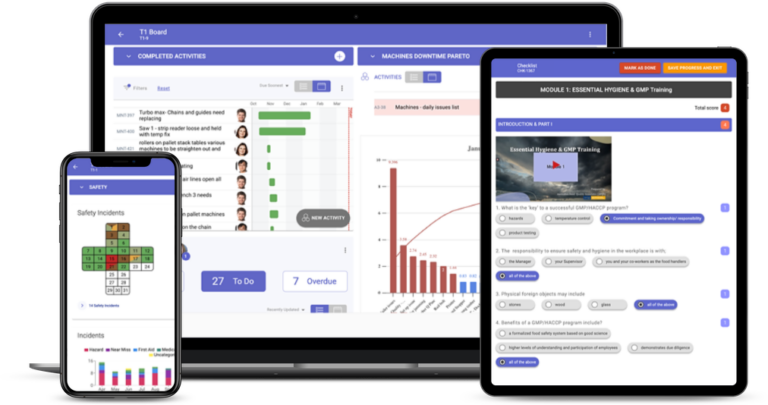
Safety inspection software replaces paper checklists with scheduled inspections done on a phone or tablet, with photos and signatures, and makes sure every failed item becomes a corrective action someone owns. In TeamAssurance, inspection results appear on the team's tier board, actions get owners and due dates, and anything the team cannot fix escalates.
The basics
What is safety inspection software?
Safety inspection software is a tool, usually a mobile app with a web dashboard, for carrying out workplace safety inspections digitally. Inspectors work through a checklist on a phone or tablet, mark each item as pass or fail, add photos and notes, and sign off. The software schedules the inspections, records the results and tracks any failed item through to a fix. Typical inspections include workplace and area walk-throughs, equipment and vehicle checks, housekeeping checks and safety audits.
Paper inspections tend to fail in the same place: the findings. A clipboard form is filled in, filed and forgotten, and the hazard it found is still there at the next inspection. Software helps most where it closes that gap, by turning each failed item into a tracked action with an owner and a due date, and by showing the person responsible, and their leader, what is still open.
TeamAssurance is a daily management platform with safety management built in, not a standalone inspection app. Inspections run as scheduled digital checklists, results appear where the team already meets, and findings become corrective actions on the same boards as quality, delivery and cost. Inspection requirements differ by industry and jurisdiction, so check what your regulator and your own safety management system expect, and use the platform to keep the records.
What it does
What to look for in safety inspection software
Inspections on a phone or tablet
Inspectors work through the checklist at the place being inspected, so findings are recorded when they are seen rather than typed up later.
Your own checklists
Build checklists to suit your sites and equipment, with photos, signatures and conditional logic, rather than being limited to a fixed library.
Scheduling and reminders
Daily, weekly and monthly inspections are scheduled and assigned, so a missed inspection is visible rather than silently skipped.
Photo evidence at the item
A failed item carries its photo and note, so the person fixing it can see exactly what was found.
Failed items become corrective actions
Each finding becomes an action with an owner and a due date, tracked until it is closed and checked, not left on a completed form.
Escalation through your tiers
Findings the team cannot resolve rise to the next tier meeting with their photo and history, so leaders see the open risks.
Trends and completion rates
See inspections completed on time, failed items by area and actions closed on time, across areas and sites.
Audit-ready records
Dated, signed digital records of inspections and the actions that followed are easy to find when an auditor asks.
Compared
Paper checklists, a standalone inspection app or TeamAssurance?
| Capability | Paper checklists and spreadsheets | Standalone inspection app | TeamAssurance |
|---|---|---|---|
| Inspection completed on a phone with photos | |||
| Scheduled inspections with visible missed ones | |||
| Failed items become actions with owners and due dates | |||
| Results reviewed in the team's daily tier meeting | |||
| Escalation of unresolved findings through the tiers | |||
| Repeat findings linked to A3 and PDCA problem solving | |||
| Hazards, incidents and audits in the same system |
How it works
How a safety inspection works in TeamAssurance
- 01
Schedule it
The inspection checklist is assigned to a person and area on a schedule, and appears on their phone when it is due.
- 02
Inspect and record
The inspector works through the checklist on site, marking items pass or fail with photos and notes, then signs off.
- 03
Act on findings
Each failed item becomes a corrective action with an owner and a due date, and the team sees it at its next huddle.
- 04
Escalate, verify and learn
Anything the team cannot fix rises to the next tier. Actions close only when the fix is confirmed, and repeat findings go to problem solving.
Use cases
Where teams use safety inspection software
- Workplace and area safety walks on manufacturing lines and in warehouses
- Equipment and vehicle checks, such as forklift and pre-start inspections
- Housekeeping and 5S inspections with photos of what was found
- Construction site inspections linked to toolbox talks and JSAs
- Reviewing open inspection actions at the Tier 1 huddle
- Comparing inspection results and open actions across sites
FAQ
Safety inspection software FAQ
What is safety inspection software?
It is software, usually a mobile app, for carrying out workplace safety inspections on a phone or tablet. It schedules inspections, records results with photos and signatures, and tracks every failed item as a corrective action until it is closed. It replaces paper checklists and spreadsheets.
What features should safety inspection software have?
Mobile checklists you can build yourself, scheduling and reminders, photo evidence, failed items that become actions with owners and due dates, escalation, trend reporting and audit-ready records. What happens after a failed item is recorded matters most, because an inspection that finds a hazard nobody fixes does not make anyone safer.
How is it different from a paper checklist?
A paper checklist records what was found. Software also schedules the inspection, attaches photos, assigns the fix and shows what is still open. It also makes missed inspections and overdue actions visible.
What can you inspect with it?
Anything you can write as a checklist: work areas, machinery, vehicles, fire equipment, housekeeping, construction sites and contractor work. Many teams start with the inspections they already do on paper.
Is TeamAssurance safety inspection software?
TeamAssurance is a daily management platform with safety management built in. Inspections run as scheduled digital checklists, and findings become corrective actions on the team's tier board, reviewed in the daily meeting and escalated when the team cannot resolve them.
Does it help with compliance?
It keeps dated digital records of inspections and follow-up actions, which supports your safety management system and audits. Inspection duties differ by country, state and industry, so check what your regulator requires.
Guided tour
See how safety inspections fits the connected operation
A five-minute walkthrough of strategy, improvement and daily management on one system: the tier boards, the actions, the escalations and the problem solving, with worked examples from the floor up.
Learn more
Definitions
Turn inspection findings into actions your team closes
Book a demo and we will run an inspection on a phone, watch a failed item land on a tier board, escalate it and close it with a verified corrective action.
Request a Demo